Ringtone Revolution: Because Every iPhone Deserves Better Than the Default Marimba
Somewhere around iOS 4, Apple made it deeply annoying to put a custom ringtone on your own phone that you own. Ringtone Revolution — the sibling site to UtubeMP3 — exists specifically to undo that annoyance: upload a track, trim it on an actual waveform, add fade and bass, and download it as MP3 or straight to iPhone's M4R format.
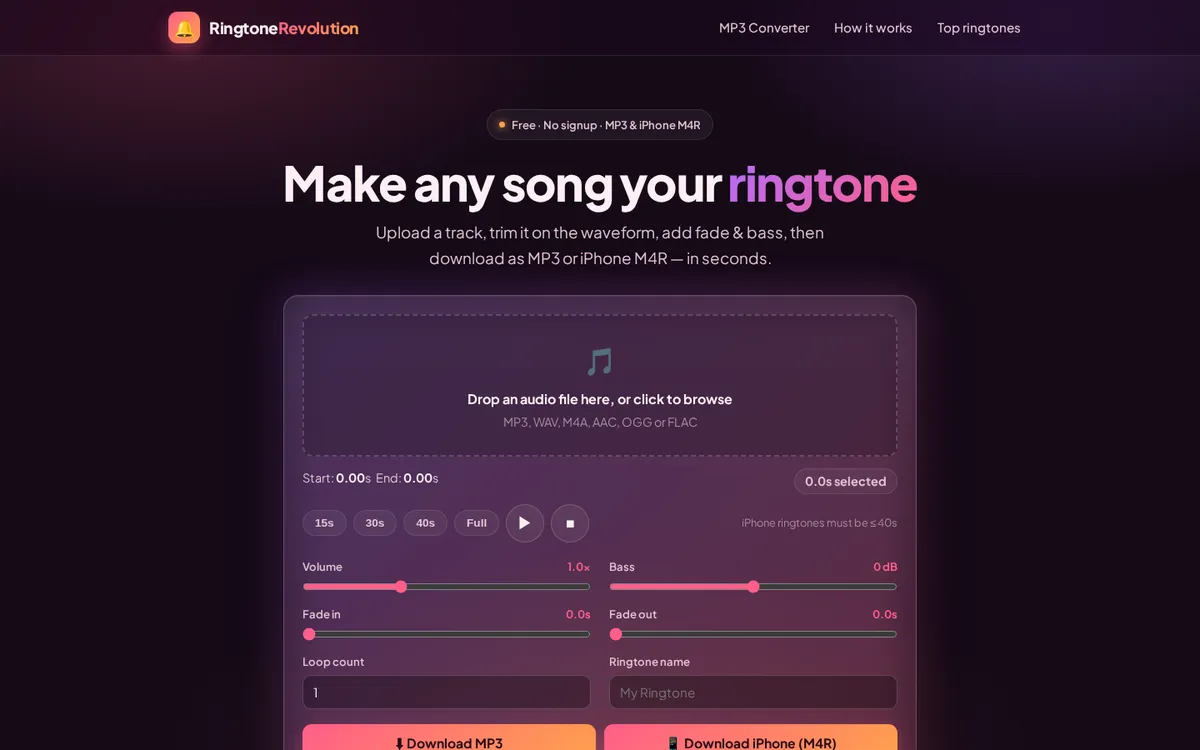
The interface is a genuinely nice piece of tool design: drag-drop a file (MP3, WAV, M4A, AAC, OGG or FLAC), set start/end points visually instead of by typing timestamps, preset trim lengths (15s / 30s / 40s / full — iPhone ringtones must be ≤40s, a limit the UI enforces before you find out the hard way), volume, bass in dB, fade in/out, loop count, and a name field so it doesn't land on your phone as "Untitled_1.m4r" forever.
Small tool, correct scope
It doesn't try to be a full DAW. It does exactly one job — turn a song into a ringtone — and does it with a waveform editor good enough that you don't need YouTube tutorials to figure out where the chorus starts. That's the same restraint that shows up across this whole family of tools: Pixelateme doesn't try to be Photoshop either, and it's better for it.
If you got here because you actually needed the MP3 first — extracted from a YouTube video, not a file you already had — UtubeMP3 is the logical first stop, one tab over.
Need the actual steps? How to convert an MP3 to a ringtone walks through trimming the clip and then getting it onto an Android phone or an iPhone — including the iPhone method that does not involve iTunes.