Pixelateme: Privacy Tool by Day, Pixel Art Machine by Night
There are two kinds of people who need to pixelate an image: the ones protecting someone's identity, and the ones trying to make their vacation photo look like it belongs in a Game Boy cartridge. Pixelateme is built for both, on the same page, with a toggle between them, and it doesn't ask which kind of person you are before it helps.
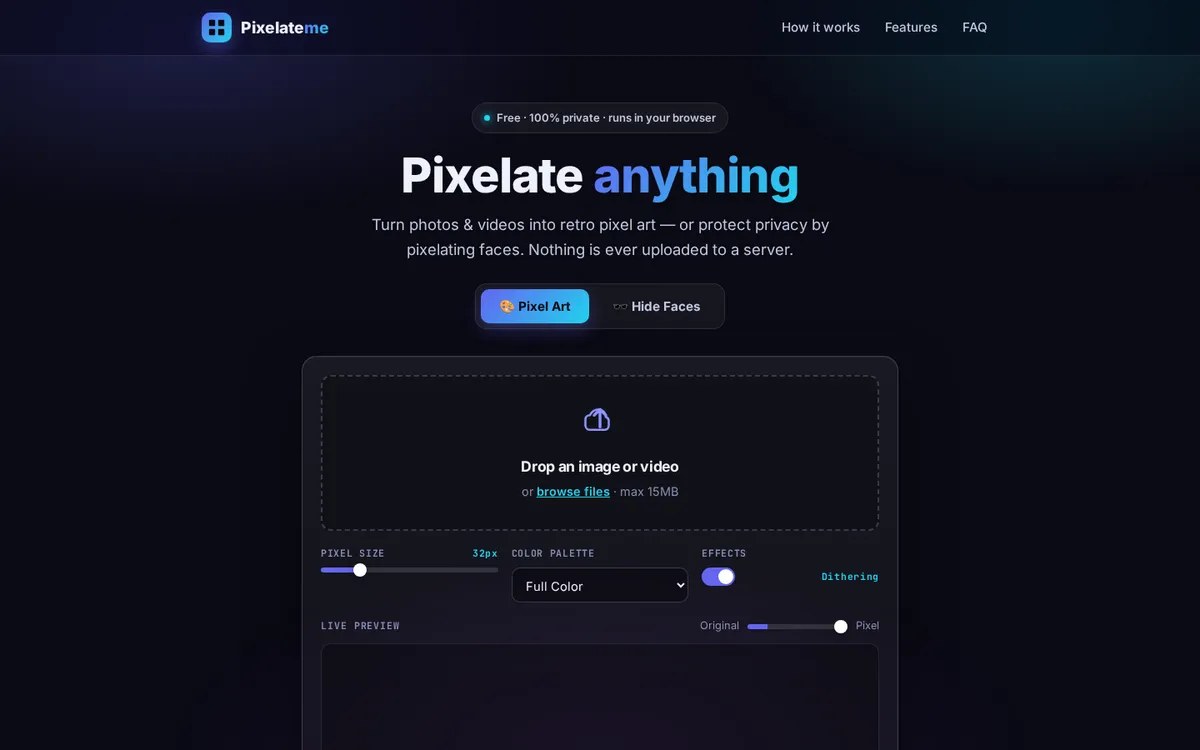
The pitch is refreshingly specific: 100% private, runs in your browser, nothing is ever uploaded. In an internet where "free tool" usually means "we now have your photo forever," that's not a small claim — it's the actual point of the product. Drop an image or video, adjust pixel size, pick a color palette, toggle dithering, watch the live preview update. No account, no server round-trip, no mystery about where that photo of your license plate just went.
Two use cases, zero compromise
Hide Faces mode is the practical one — auto-detect or draw your own regions to blur out people in a photo before it goes anywhere public. Pixel Art mode is the fun one — same underlying engine, aimed at making something deliberately retro instead of deliberately anonymous. It's a nice bit of software design: one real technical capability (controlled, client-side pixelation), two completely different reasons someone might want it.
If you liked the "does one thing, does it entirely in your browser, asks nothing of you" energy here, Vision Mapr runs on a similar philosophy — free, no paywalled features, just fewer pixels and more nodes. And if what you actually need pixelated is a video, not a photo, UtubeMP3 at least gets you the audio out of it first.