A Guide to Using Exo for LLM Clusters
What Exo actually does
Exo pools several machines into one inference cluster. Rather than needing a single GPU big enough to hold an entire model, it shards the model across whatever you own — desktops, laptops, Macs, even phones — and treats their combined memory as one pool. Nodes discover each other automatically and elect a master, so there is very little to configure.
That is a genuinely lovely idea if you have a pile of hardware and no single big GPU. Which described my three-node Proxmox cluster exactly, and is why I tried it.
Read this before you spend an evening on it
One detail decides whether this will work for you, and it is easy to miss: Exo is built around Apple Silicon. On macOS it uses the GPU through the MLX backend and is genuinely fast. On Linux it has run on CPU, which means a Linux cluster pools memory but gives you almost none of the speed you were hoping for. A stack of x86 mini PCs will load a big model and then generate tokens at a pace that makes you close the tab.
So, bluntly:
- A few Macs on a fast network — worth your time.
- Mixed or Linux-only x86 boxes — you will get it running and then not use it.
- One machine with a decent GPU — skip Exo, run Ollama or llama.cpp, be happier.
It is also still an experimental project rather than something to build a service on. Treat it as a fascinating way to learn how model sharding works, not as infrastructure.
With that said, here is what setting it up actually looked like.
I recently explored setting up Exo, a framework for distributing large language models (LLMs) across multiple nodes in a cluster. The goal was to create a powerful offline AI assistant by utilizing my 3-node Proxmox VE cluster.
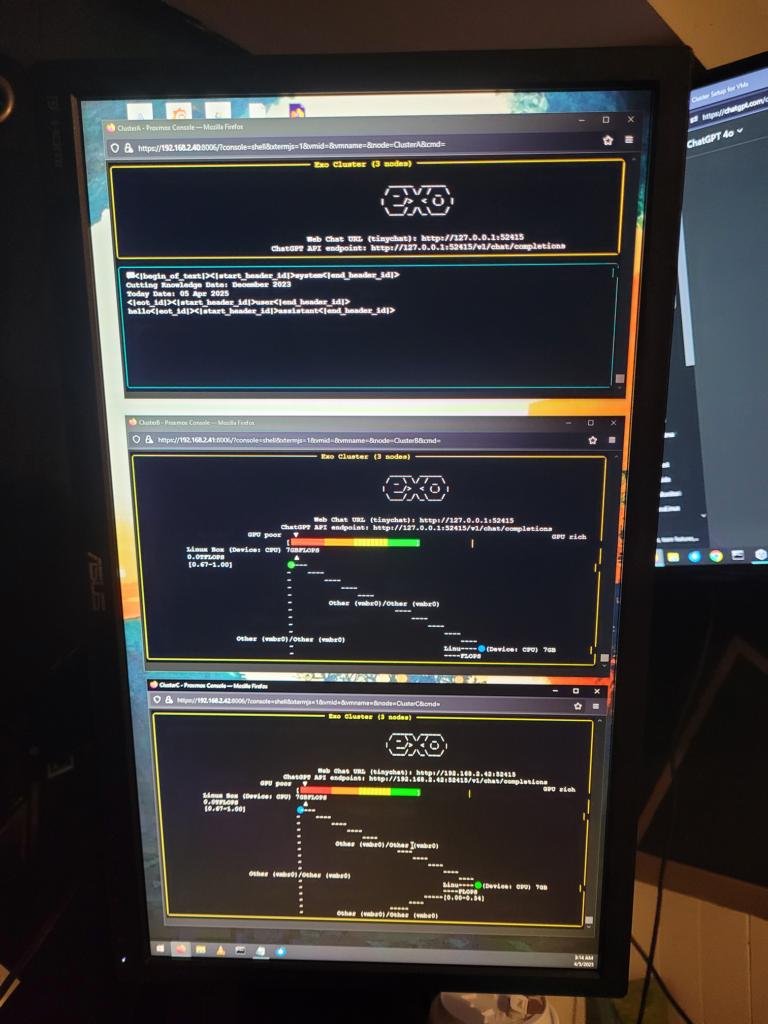
My nodes are uniform, each with:
- Intel HD Graphics 530 (integrated GPU)
- Multi-core CPUs (no AVX-512)
- 16 GB RAM per node
- Running lightweight VMs with Debian-based distros
This blog post outlines my experience, step-by-step setup, issues I encountered, and ultimately why I could not use Exo effectively in this configuration.
Why Exo?
Exo promises:
- Distributed inference for LLMs (like Mistral or LLaMA)
- Support for containerized node deployment
- Scalability with multiple compute nodes
- Open-source and locally hosted
It’s a promising project, especially for offline use in homelab environments.
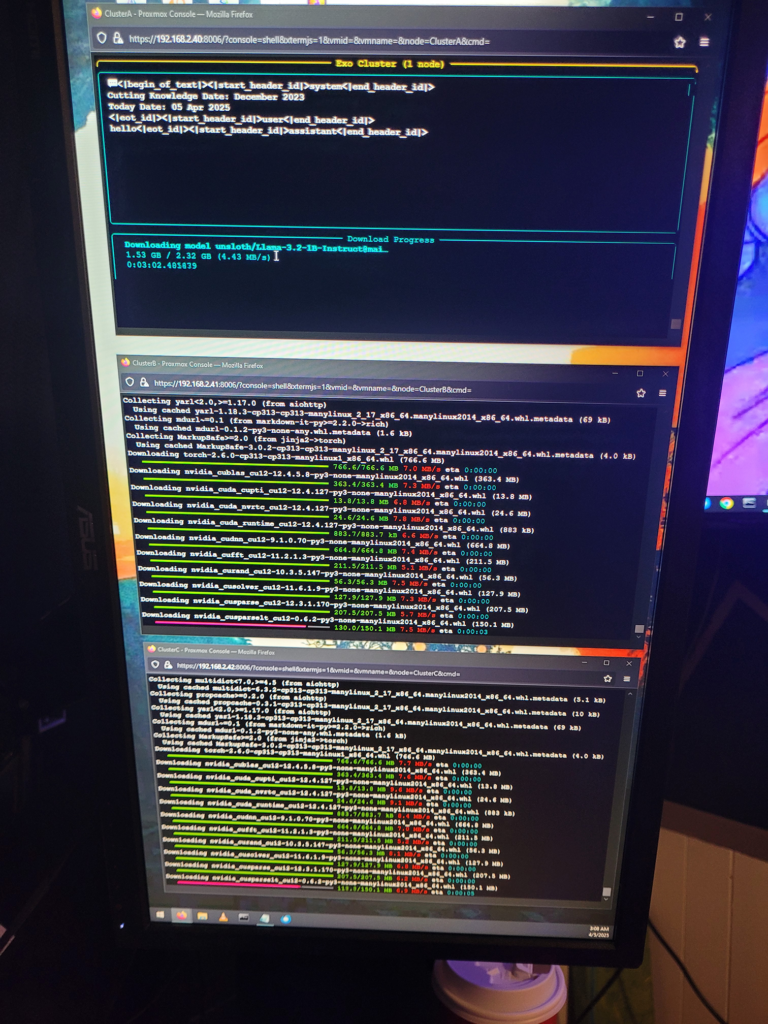
Step-by-Step Installation Summary
1. Git Clone and Setup
git clone https://github.com/exo-explore/exo.git
cd exo
2. Install Prerequisites (on all nodes)
sudo apt update && sudo apt install -y python3 python3-venv build-essential git3. Create Python venv
python3 -m venv .venv
source .venv/bin/activate
pip install -r requirements.txt
After installing countless dependencies, I finally got this running on all 3 nodes, and all three nodes could see each other. Everything looked to be running smoothly at this point. When I tried to interact with AI, the program would just error out. Basically due to my lack of GPU hardware on the cluster.
Issues Encountered
🚫 No GPU Support for Exo Inference
- Exo requires GPU acceleration to function efficiently.
- My hardware (Intel HD 530) has no CUDA, no ROCm, and no OpenCL support for PyTorch.
- CPU-only fallback is not officially supported or extremely inefficient.
🛠 Incompatibility with Llama.cpp
Some models I tested (GGUF via llama.cpp) were not compatible with Exo’s loading mechanism.
⚠️ Lack of Community Support for CPU-only Clusters
Very few users seem to be running Exo without GPUs. Issues related to CPU fallback were largely unanswered or marked as unsupported.
Workarounds I Attempted
- ✅ Tried smaller models (TinyLLaMA, Phi-2 quantized) — still slow or failed to start
- ✅ Lowered worker thread count and concurrency — still slow or failed to start
- ✅ Rewrote config for minimal parallelism — still slow or failed to start
Final Decision: Move to Ollama + Load Balancing
Due to lack of GPU support, I chose to:
- Decommission Exo from my stack
- Use Ollama instead — it runs well on CPU-only systems
- Deploy one model per node in my Proxmox cluster
- Build a load balancer + lightweight chat UI to mimic distributed inference
My Conclusions
While Exo is a very exciting project and I so wish I had it running on this cluster, it’s currently not viable for:
- Clusters without dedicated NVIDIA or AMD GPUs
- Homelabs with integrated graphics only
If you’re in a similar situation and want to run LLMs locally:
- ✅ Use Ollama for GGUF models (CPU-optimized)
- ✅ Explore Text Generation WebUI or LM Studio
- ✅ Create a local load-balanced endpoint for pseudo-clustered inference
I will be adding a new server to my home lab with an Nvidia GPU, so I will have this running eventually.
Hopefully Exo evolves to support CPU clusters in the future — I’ll be watching!
Questions people ask
What is Exo?
Exo is an open-source framework that connects several devices on your network into a single LLM inference cluster. It shards a model across the machines and pools their memory, so you can run a model larger than any one device could hold.
How do you set up Exo on a cluster?
Install it on each node, make sure they are on the same network, and start it - nodes discover each other automatically and elect a master, so there is little manual configuration. The step-by-step summary from my three-node Proxmox attempt is below.
Does Exo work well on Linux?
Not as well as on a Mac. Exo is optimised for macOS, where it uses the GPU via the MLX backend; on Linux it has run on CPU, so a Linux cluster pools memory without giving you much of the speed benefit. That is the main reason I abandoned mine.
Is Exo faster than running a model on one machine?
Usually not, if that one machine has a GPU big enough for the model. Exo's value is running models that would otherwise not fit at all. Splitting a model that already fits on your GPU adds network latency for no gain.
Can I mix different kinds of hardware?
Yes, that is the pitch - Macs, PCs, laptops and phones together. In practice a mixed cluster runs at the pace of its weakest link and the network between them, so the result is often disappointing.
Is Exo production ready?
No. It is an experimental project and is best treated as a way to learn about distributed inference rather than something to depend on. If you need reliability, run a single-node stack like Ollama or llama.cpp.