Does Jellyfin Play FLAC? Yes, and When It Doesn't
The short answer
Yes — Jellyfin plays FLAC. The server has handled it for years, and most modern clients (the web player, Finamp, Symfonium, Feishin, the desktop apps) will Direct Play a FLAC file: no conversion, no quality loss, bit-for-bit what is on disk.
So if you are asking "does Jellyfin support FLAC" before committing a music library to it — it does. Rip away.
Where it gets messy is transcoding. FLAC is only effortless when the client can take it as-is. The moment something forces the server to convert on the fly, you are relying on a much less well-trodden path, and that is where the reports of silence, stutter and pinned CPU come from. The usual triggers:
- A client that can't decode FLAC — some older browsers, some TV and car-stereo apps, and a fair few DLNA renderers. The server transcodes to something they understand, and quality and CPU both take the hit.
- FLAC as the audio track of a video file. This is the one that bites people: when the video gets transcoded, the FLAC audio path has historically been the flaky part, and "video plays, audio is silent" is a known failure mode on some clients.
- Channel or sample-rate mismatches — pushing a 5.1 or 24-bit/192 kHz track at a stereo device forces a conversion even when the codec itself is supported.
- Thin server hardware. Audio transcoding is cheap next to video, but a low-power NAS serving several streams will still feel it.
Which is a long way of saying: FLAC is the right format to store, and a sometimes-awkward format to stream to whatever random device you happen to be holding. That gap is exactly what sent me down the rabbit hole below — I got tired of one particular device choking, and built a stupidly simple converter instead of fighting the transcoder.
The build story
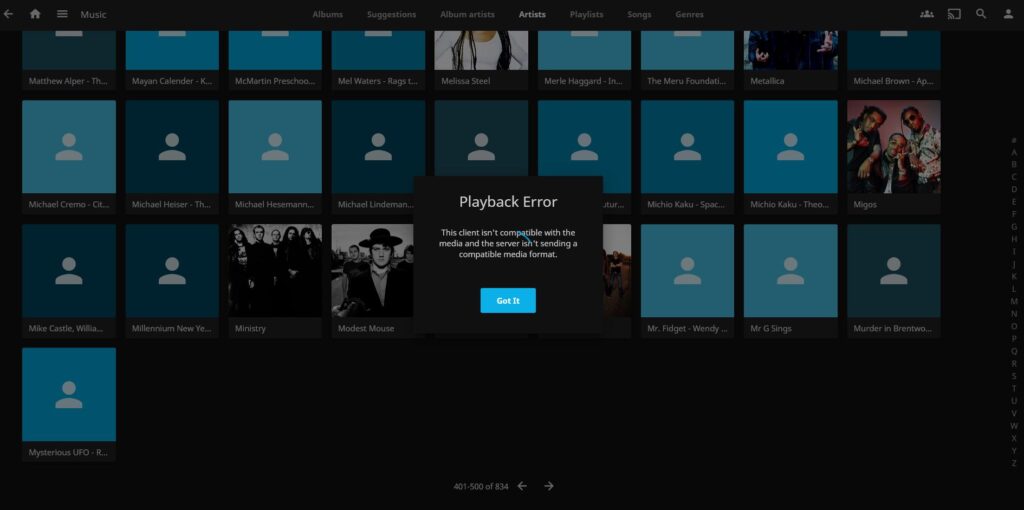
Let me paint you a picture. I'm running a Jellyfin media server (because I like my stuff local, thank you very much), and everything was smooth—until I threw some FLAC files at it. Cue the buffering, crashing, and a whole bunch of "Why won't this work?!" moments. Turns out, Jellyfin + FLAC isn't always a match made in heaven, especially on less beefy hardware.
So what did I do? Built my own freakin' web app to fix it.
The Problem: FLAC Drama in Jellyfin
Jellyfin’s a fantastic media server, but FLAC files, especially in larger libraries, can be a bit much. My setup was running on an AlmaLinux 9 VM, already handling torrent duties and some other lightweight services. I wanted something that could convert FLAC to MP3 or WAV—cleanly, quickly, and ideally via a simple web interface so I didn’t have to mess with the command line every time.
The Solution: A Custom DIY Audio Converter Web App
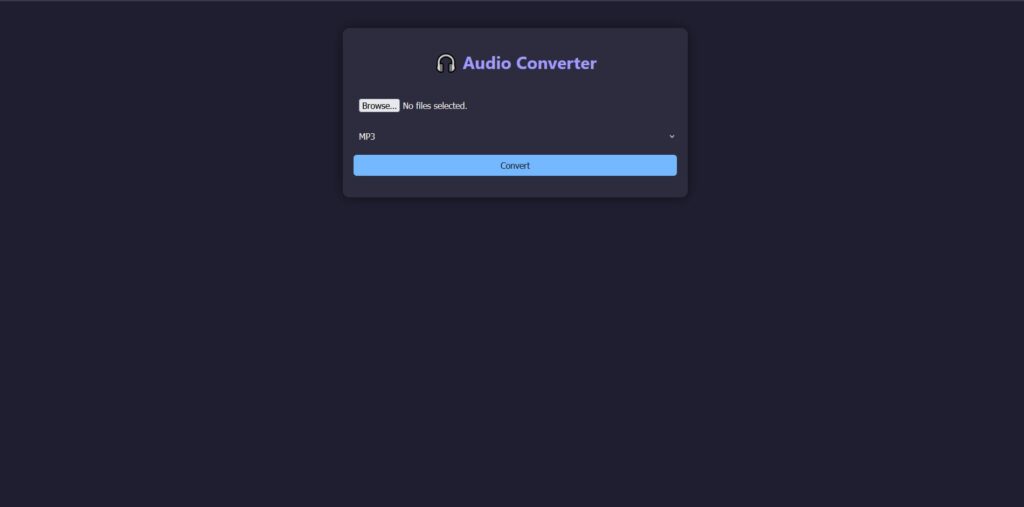
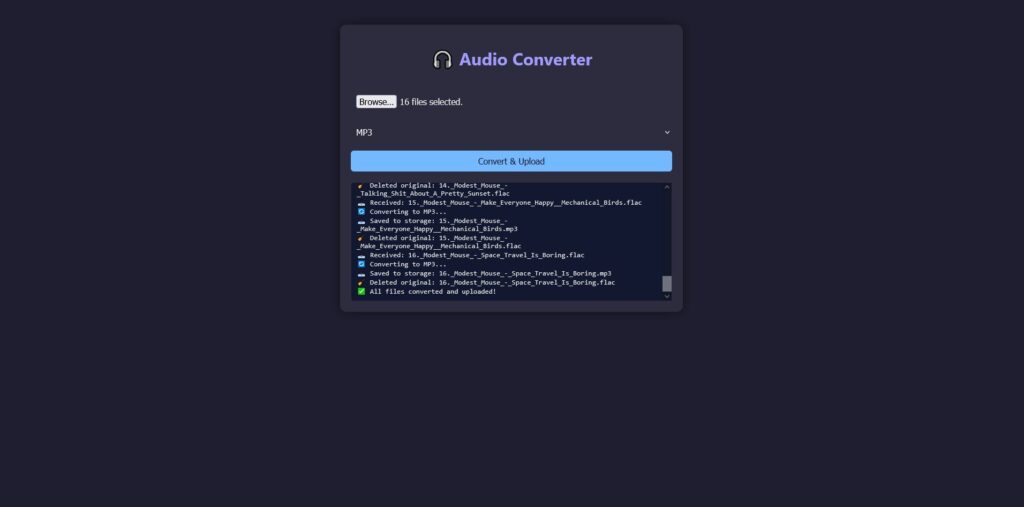
I didn’t want bloat. I didn’t want another media manager. I wanted a focused tool that just... converts audio. So I built a Flask-based web app, wrapped it in Gunicorn, and turned it into a systemd service. It’s lightweight, fast, and looks great with a dark pastel theme.
Features I Needed (and Got):
- Upload audio files via web UI
- Convert to MP3, WAV, or AAC using FFmpeg
- Save converted files directly to my mounted network storage
- Automatically delete the uploaded original files after conversion
- Provide real-time logging of conversion status via the web UI
- Modern interface with dark pastel colors (yes, vibes matter)
- Runs as a persistent background service
- Minimal resource usage
- Accessible from any device on my LAN
- Supports batch/multi-file uploads
Tech Stack
- Python 3 + Flask – For the core web server
- FFmpeg – Does the actual heavy lifting for conversion
- Gunicorn – A production-ready WSGI server
- systemd – To manage the service reliably across reboots
- AlmaLinux 9 MusicServ – Running as a VM in my home lab
Step-by-Step: Full Reproducible Setup with Code
1. Install Dependencies
sudo dnf install epel-release -y
sudo dnf install ffmpeg python3 python3-pip nginx -y
pip3 install --user flask gunicorn
2. Directory Layout
/opt/audio_converter/
├── app.py
├── run_gunicorn.sh
├── uploads/
├── templates/
│   └── index.html
└── static/
    ├── css/style.css
    └── js/main.js
3. app.py
from flask import Flask, request, render_template, Response, stream_with_context
import os, subprocess, time
from werkzeug.utils import secure_filename

BASE_DIR = os.path.dirname(os.path.abspath(__file__))
UPLOAD_FOLDER = os.path.join(BASE_DIR, 'uploads')
STORAGE_PATH = "/mnt/media_storage/audio_converted"
ALLOWED_EXTENSIONS = {'mp3', 'flac', 'aac', 'wav', 'ogg', 'm4a'}

app = Flask(__name__, static_folder='static', template_folder='templates')
app.config['UPLOAD_FOLDER'] = UPLOAD_FOLDER

os.makedirs(UPLOAD_FOLDER, exist_ok=True)
os.makedirs(STORAGE_PATH, exist_ok=True)

def allowed_file(filename):
    return '.' in filename and filename.rsplit('.', 1)[1].lower() in ALLOWED_EXTENSIONS

def convert_file(input_path, output_path):
    subprocess.run(['ffmpeg', '-y', '-i', input_path, output_path],
                   stdout=subprocess.DEVNULL, stderr=subprocess.DEVNULL)

@app.route('/')
def index():
    return render_template('index.html')

@app.route('/convert_stream', methods=['POST'])
def convert_stream():
    files = request.files.getlist('audiofiles')
    output_format = request.form.get('format')

    @stream_with_context
    def generate():
        for file in files:
            if file and allowed_file(file.filename):
                filename = secure_filename(file.filename)
                input_path = os.path.join(app.config['UPLOAD_FOLDER'], filename)
                file.save(input_path)

                yield f"data: 📥 Received: {filename}\n\n"
                time.sleep(0.2)

                base = os.path.splitext(filename)[0]
                output_filename = f"{base}.{output_format}"
                output_path = os.path.join(STORAGE_PATH, output_filename)

                yield f"data: 🔄 Converting to {output_format.upper()}...\n\n"
                convert_file(input_path, output_path)
                time.sleep(0.2)

                yield f"data: 📤 Saved to storage: {output_filename}\n\n"

                os.remove(input_path)
                yield f"data: 🧹 Deleted original: {filename}\n\n"
                time.sleep(0.1)

        yield "data: ✅ All files converted and uploaded!\n\n"

    return Response(generate(), mimetype='text/event-stream')

if __name__ == "__main__":
    app.run(host="0.0.0.0", port=5000)
4. run_gunicorn.sh
#!/bin/bash
source ~/.bashrc
/home/rzasharp/.local/bin/gunicorn -w 1 -t 600 -b 0.0.0.0:8000 app:app
5. templates/index.html
<!DOCTYPE html>
<html lang="en">
<head>
  <meta charset="UTF-8">
  <title>Audio Converter</title>
  <link rel="stylesheet" href="/static/css/style.css">
  <meta http-equiv="Content-Type" content="text/html; charset=utf-8"/>
</head>
<body>
  <div class="container">
    <h1>🎧 Audio Converter</h1>
    <form id="uploadForm" enctype="multipart/form-data" method="POST" action="/convert_stream">
      <input type="file" name="audiofiles" multiple required>
      <select name="format">
        <option value="mp3">MP3</option>
        <option value="wav">WAV</option>
        <option value="aac">AAC</option>
      </select>
      <button type="submit">Convert & Upload</button>
    </form>
    <div id="statusBox" class="status"></div>
  </div>
  <script src="/static/js/main.js"></script>
</body>
</html>
6. static/css/style.css
body {
  margin: 0;
  font-family: 'Segoe UI', sans-serif;
  background-color: #1E1E2F;
  color: #ECECEC;
}

.container {
  max-width: 600px;
  margin: 50px auto;
  padding: 20px;
  background-color: #2C2C3E;
  border-radius: 12px;
  box-shadow: 0 0 20px rgba(0,0,0,0.5);
}

h1 {
  color: #A29BFE;
  text-align: center;
}

input[type="file"], select, button {
  width: 100%;
  padding: 10px;
  margin-top: 15px;
  border: none;
  border-radius: 6px;
  font-size: 1em;
}

select {
  background-color: #2C2C3E;
  color: #ECECEC;
}

button {
  background-color: #74B9FF;
  color: #1E1E2F;
  cursor: pointer;
  transition: background-color 0.3s;
}

button:hover {
  background-color: #81ECEC;
}

.status {
  height: 200px;
  overflow-y: auto;
  white-space: pre-line;
  font-family: monospace;
  background: #11182f;
  border: 1px solid #2c2c3e;
  border-radius: 6px;
  margin-top: 20px;
  padding: 10px;
}
7. static/js/main.js
document.getElementById("uploadForm").addEventListener("submit", function (e) {
  e.preventDefault();

  const form = e.target;
  const statusBox = document.getElementById("statusBox");
  statusBox.innerHTML = "";

  const formData = new FormData(form);

  fetch('/convert_stream', {
    method: 'POST',
    body: formData
  }).then(response => {
    const reader = response.body.getReader();
    const decoder = new TextDecoder("utf-8");

    function read() {
      reader.read().then(({ done, value }) => {
        if (done) return;

        const chunk = decoder.decode(value, { stream: true });
        chunk.split("\n\n").forEach(line => {
          if (line.startsWith("data: ")) {
            const msg = line.replace("data: ", "").trim();
            if (msg) {
              statusBox.innerHTML += msg + "<br/>";
              statusBox.scrollTop = statusBox.scrollHeight;
            }
          }
        });

        read();
      });
    }

    read();
  });
});
8. systemd service (optional)
[Unit]
Description=Flask Audio Converter Service
After=network.target

[Service]
User=rzasharp
WorkingDirectory=/opt/audio_converter
ExecStart=/opt/audio_converter/run_gunicorn.sh
Environment="PATH=/home/rzasharp/.local/bin:/usr/bin:/bin"
Restart=always

[Install]
WantedBy=multi-user.target
Then:
sudo systemctl daemon-reload
sudo systemctl enable --now audio_converter
Boom. Now it auto-starts on reboot and runs quietly in the background like a good little daemon.
Issues I Ran Into
- FLASK ONLY BINDING TO LOCALHOST: It was running on 127.0.0.1 and not accessible from other devices. Fixed it by using
host='0.0.0.0'. - Permission Errors: Flask couldn’t write to the upload folder. A quick
chown -Rto my user solved that. - systemd wouldn’t launch gunicorn: Turned out gunicorn was in my
.local/bin, which systemd doesn’t see by default. Fixed it by wrapping in a shell script. - Wanting to delete originals: Added a checkbox and Python logic to remove original files post-conversion.
Resource Usage
Ridiculously light. We're talking ~1–2% CPU when converting and ~60MB RAM. It’s perfect to run alongside torrents or other lightweight tools on a low-resource VM.
Why I Love This
- I don’t have to think about it anymore.
- Anyone on my network can convert files (yes, you can add auth later).
- It just works—and it looks damn good doing it.
If you’re running Jellyfin or any other media server that chokes on FLAC or lossless audio formats, this setup is gold. Total time to build and debug everything? Around 4 hours. Clean. Simple. Reusable. Efficient.
Questions people ask
Does Jellyfin play FLAC?
Yes. Jellyfin supports FLAC natively, and most modern clients - the web player, Finamp, Symfonium, Feishin and the desktop apps - will Direct Play it with no conversion and no quality loss.
Can Jellyfin play FLAC without transcoding?
Yes, that is the normal case. If the client can decode FLAC, Jellyfin streams the original file untouched. Transcoding only kicks in when the client cannot handle the codec, the channel layout or the sample rate.
Why is there no audio when my video has a FLAC track?
This is a transcoding issue rather than a FLAC support issue. When a video with FLAC audio has to be transcoded, some clients have historically ended up with video but no sound. Try a different client, or one that can Direct Play the file.
Should I store my music library as FLAC or MP3 for Jellyfin?
Store FLAC. It is lossless, Jellyfin handles it, and you can always convert down later - you can never convert back up. Keep MP3 conversions as disposable copies for devices that are awkward.
Does FLAC use a lot of CPU to transcode?
Far less than video, but it is not free. A low-power NAS serving several simultaneous audio transcodes will notice. Direct Play costs essentially nothing, so it is worth choosing clients that support FLAC natively.
What if my device just won't play FLAC?
Either let Jellyfin transcode it, or keep a converted copy. I got tired of the first option for one stubborn device and built a small FLAC-to-MP3 web converter, which is what the rest of this post is about.